Jarvis1Artificial IntelligenceAutomation+10देखेंआमंत्रित करेंवोट करें (0)# 🤖 Meet Jarvis: The AI That Actually Runs Your Server **Most AI bots just chat. Jarvis takes action.** Jarvis is a next-generation Discord Administrator powered by advanced AI. Unlike standard bots that require you to memorize complex command syntax, Jarvis understands natural language and has "Root Access" to manage your server infrastructure. He knows your roles, sees your channels, and remembers your rules. --- ## 🧠 The AI Super-Admin Experience ### 🗣️ Natural Language Moderation Stop typing `/timeout user:@Troll duration:10m reason:Spam`. **Just say:** > *"Jarvis, mute @Troll for 10 minutes, he's being annoying."* **Jarvis Reacts:** > *"🤐 Muted @Troll. Silence is golden."* ### 🛡️ Dynamic Permission Management Jarvis features a visual **Audit Dashboard** to manage who can use his commands. * **Check Access:** Use `/permissions` to see a live "Green/Red" audit of every command. * **Grant Access via Chat:** *"Jarvis, let the @Moderator role use the ban command."* * **Secure:** Jarvis checks the database in real-time. He won't hallucinate roles that don't exist. ### 📚 RAG Knowledge Base (Learn & Teach) Jarvis doesn't just guess; he learns. * **Teach Him:** `/learn topic:Verification content:Go to #rules and react with ✅.` * **Ask Him:** When a user asks *"How do I verify?"*, Jarvis answers using **your** specific server data. --- ## 🛠️ Complete Feature Suite Jarvis isn't just an AI; he's a full-stack server manager. ### ⚔️ Moderation & Security * **Smart AutoMod:** AI-powered context checks for toxicity. * **Mod Logs:** Detailed audit trails for every AI action. * **Sticky Messages:** Pin important alerts to the bottom of chat. * **Remote Admin:** Secure "God Mode" for bot owners to manage the bot from anywhere. ### ⚙️ Utilities & Tools * **Ticket System:** One-click support tickets with transcripts. * **Temp Voice:** "Join to Create" voice channels that auto-delete when empty. * **Audit Dashboard:** Visual breakdown of command permissions. ### 🎉 Fun & Engagement * **Leveling System:** XP, ranks, and leaderboards to reward activity. * **Giveaways:** Easy hosting with automatic winner selection. * **Welcome Cards:** Custom welcome images for new members. * **Reaction Roles:** Self-service role assignment. --- ## 🚀 Why Jarvis? 1. **He's Context-Aware:** He reads the actual server state (Channels/Roles) before acting, so he makes zero mistakes. 2. **He's Secure:** Strict permission checks prevent unauthorized users from tricking the AI. 3. **He's Fun:** A witty, sarcastic persona that makes moderation entertaining. **Invite Jarvis today and experience the future of Discord automation.** # 🤖 Meet Jarvis: The AI That Actually Runs Your Server **Most AI bots just chat. Jarvis takes action.** Jarvis is a next-generation Discord Administrator powered by advanced AI. Unlike standard bots that require you to memorize complex command syntax, Jarvis understands natural language and has "Root Access" to manage your server infrastructure. He knows your roles, sees your channels, and remembers your rules. --- ## 🧠 The AI Super-Admin Experience ### 🗣️ Natural Language Moderation Stop typing `/timeout user:@Troll duration:10m reason:Spam`. **Just say:** > *"Jarvis, mute @Troll for 10 minutes, he's being annoying."* **Jarvis Reacts:** > *"🤐 Muted @Troll. Silence is golden."* ### 🛡️ Dynamic Permission Management Jarvis features a visual **Audit Dashboard** to manage who can use his commands. * **Check Access:** Use `/permissions` to see a live "Green/Red" audit of every command. * **Grant Access via Chat:** *"Jarvis, let the @Moderator role use the ban command."* * **Secure:** Jarvis checks the database in real-time. He won't hallucinate roles that don't exist. ### 📚 RAG Knowledge Base (Learn & Teach) Jarvis doesn't just guess; he learns. * **Teach Him:** `/learn topic:Verification content:Go to #rules and react with ✅.` * **Ask Him:** When a user asks *"How do I verify?"*, Jarvis answers using **your** specific server data. --- ## 🛠️ Complete Feature Suite Jarvis isn't just an AI; he's a full-stack server manager. ### ⚔️ Moderation & Security * **Smart AutoMod:** AI-powered context checks for toxicity. * **Mod Logs:** Detailed audit trails for every AI action. * **Sticky Messages:** Pin important alerts to the bottom of chat. * **Remote Admin:** Secure "God Mode" for bot owners to manage the bot from anywhere. ### ⚙️ Utilities & Tools * **Ticket System:** One-click support tickets with transcripts. * **Temp Voice:** "Join to Create" voice channels that auto-delete when empty. * **Audit Dashboard:** Visual breakdown of command permissions. ### 🎉 Fun & Engagement * **Leveling System:** XP, ranks, and leaderboards to reward activity. * **Giveaways:** Easy hosting with automatic winner selection. * **Welcome Cards:** Custom welcome images for new members. * **Reaction Roles:** Self-service role assignment. --- ## 🚀 Why Jarvis? 1. **He's Context-Aware:** He reads the actual server state (Channels/Roles) before acting, so he makes zero mistakes. 2. **He's Secure:** Strict permission checks prevent unauthorized users from tricking the AI. 3. **He's Fun:** A witty, sarcastic persona that makes moderation entertaining. **Invite Jarvis today and experience the future of Discord automation.** देखेंआमंत्रित करेंवोट करें (0)
Ticket Tool AI14aiai automation+7देखेंआमंत्रित करेंवोट करें (0)<style> ::-webkit-scrollbar { width: 8px; } ::-webkit-scrollbar-track { background: transparent; } ::-webkit-scrollbar-thumb { background: linear-gradient(180deg, #e91e63, #00bcd4); border-radius: 10px; } /* Target buttons in the header area */ header button, nav button, [class*="header"] button, [class*="actions"] button, button[aria-label*="Invite"], button[aria-label*="Vote"] { background: linear-gradient(120deg, #e91e63, #00bcd4) !important; color: white !important; border-radius: 8px !important; } </style> ## Upscale your discord support ticket system!  Ticket Tool AI is an AI powered Discord ticket bot that proactively detects when users need help and suggests support tickets. It uses vector embeddings and semantic search to find relevant answers from your knowledge base via RAG (Retrieval Augmented Generation), delivering context-aware responses. The bot learns over time through intelligent response caching, improving accuracy. It analyzes messages in real time, categorizes issues, and provides instant AI powered support within ticket channels, improving response quality as it processes more interactions ## **Check out our bot in action!** [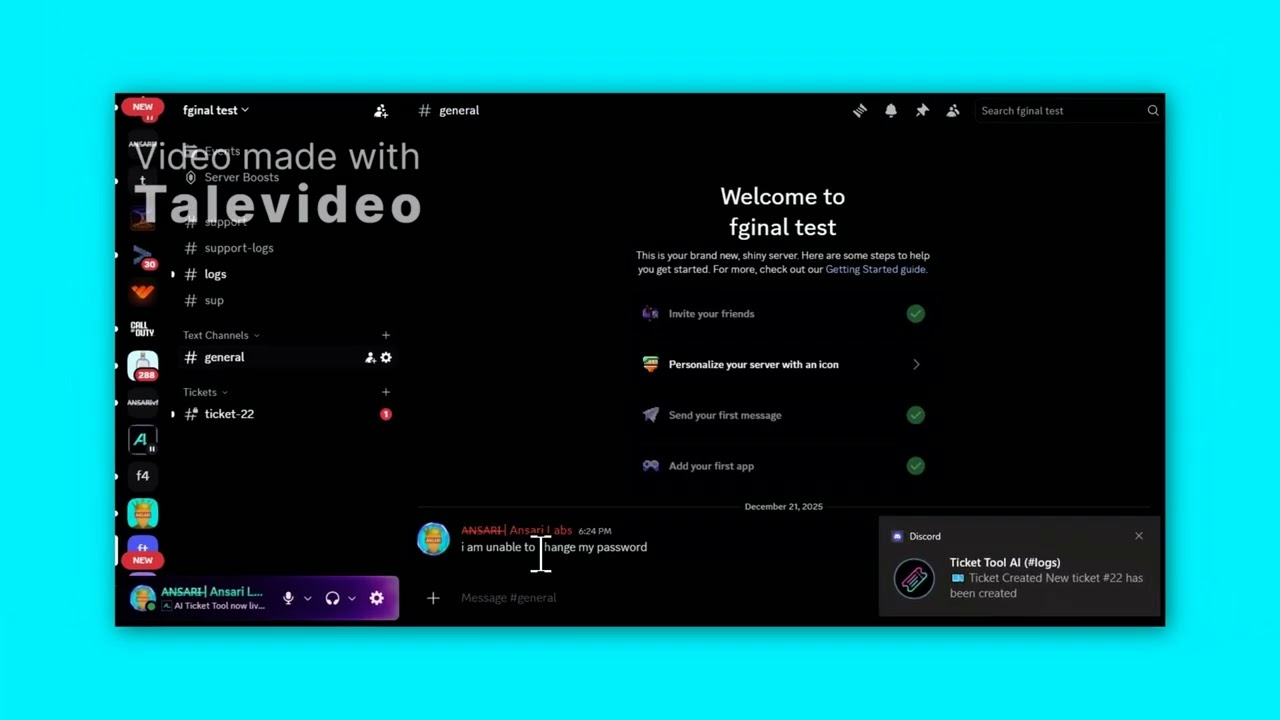](https://www.youtube.com/watch?v=pKmommx_KF4) ## Why this ticket tool? Most ticket bots requires manual operation. This bot automates the entire support workflow and adds an AI layer on top ***AI assisted, not just auto responding*** It doesn’t spit out generic replies. It builds a proper knowledge base from your docs/files and uses retrieval augmented generation to give grounded answers in tickets, with controls for where and when AI is allowed to speak. ***End‑to‑end ticket lifecycle automation*** Beyond “open channel, close channel”, it creates the support + logs channels automatically, enforces one active ticket per user, tracks claims and status, and generates + stores transcripts automatically (DM to user + post in logs) on close. ***Deep observability and analytics built‑in*** Instead of just “tickets open/close”, you get stats and activity to see volumes, open vs closed, average resolution times, and staff activity trends without needing an external dashboard. ***Serious admin controls over automation & AI*** You can toggle detector/responder behavior, restrict which channels the AI watches, inspect caches and knowledge entries, and manage everything via slash commands and modals so automation never feels “out of control.” ## The workflow It consists of 3 parts **1. AI detector** **2. AI responder** **3. AI closure** User shows need for help/assistance in the general chat -> Ai detects using confidence scale -> 80% confidence -> bot will prompt to open the ticket for user <- 80% confidence -> bot detector will not respond if user prompt to open the ticket, the bot will create a ticket for user same as clicking the open button on the ticket panel once inside the ticket, the AI responder will work answering the user queries it can detect informal, formal, casual, slang etc all types of sentence formation if issue is still not resolved after 2 AI responses, it will ping the admin roles added through /add pingrole command if issue is to be solved by backend team (technical issues etc) , it will respond with what you have added to "continue response" section using /learn-from or learn-from-docs command + ping the admin role otherwise, it will work as intended if the users shows positive sentiment, AI closure will prompt to close the ticket if the user choose "close the ticket" , it will close the ticket if the user choose "no", it will keep responding<style> ::-webkit-scrollbar { width: 8px; } ::-webkit-scrollbar-track { background: transparent; } ::-webkit-scrollbar-thumb { background: linear-gradient(180deg, #e91e63, #00bcd4); border-radius: 10px; } /* Target buttons in the header area */ header button, nav button, [class*="header"] button, [class*="actions"] button, button[aria-label*="Invite"], button[aria-label*="Vote"] { background: linear-gradient(120deg, #e91e63, #00bcd4) !important; color: white !important; border-radius: 8px !important; } </style> ## Upscale your discord support ticket system!  Ticket Tool AI is an AI powered Discord ticket bot that proactively detects when users need help and suggests support tickets. It uses vector embeddings and semantic search to find relevant answers from your knowledge base via RAG (Retrieval Augmented Generation), delivering context-aware responses. The bot learns over time through intelligent response caching, improving accuracy. It analyzes messages in real time, categorizes issues, and provides instant AI powered support within ticket channels, improving response quality as it processes more interactions ## **Check out our bot in action!** [](https://www.youtube.com/watch?v=pKmommx_KF4) ## Why this ticket tool? Most ticket bots requires manual operation. This bot automates the entire support workflow and adds an AI layer on top ***AI assisted, not just auto responding*** It doesn’t spit out generic replies. It builds a proper knowledge base from your docs/files and uses retrieval augmented generation to give grounded answers in tickets, with controls for where and when AI is allowed to speak. ***End‑to‑end ticket lifecycle automation*** Beyond “open channel, close channel”, it creates the support + logs channels automatically, enforces one active ticket per user, tracks claims and status, and generates + stores transcripts automatically (DM to user + post in logs) on close. ***Deep observability and analytics built‑in*** Instead of just “tickets open/close”, you get stats and activity to see volumes, open vs closed, average resolution times, and staff activity trends without needing an external dashboard. ***Serious admin controls over automation & AI*** You can toggle detector/responder behavior, restrict which channels the AI watches, inspect caches and knowledge entries, and manage everything via slash commands and modals so automation never feels “out of control.” ## The workflow It consists of 3 parts **1. AI detector** **2. AI responder** **3. AI closure** User shows need for help/assistance in the general chat -> Ai detects using confidence scale -> 80% confidence -> bot will prompt to open the ticket for user <- 80% confidence -> bot detector will not respond if user prompt to open the ticket, the bot will create a ticket for user same as clicking the open button on the ticket panel once inside the ticket, the AI responder will work answering the user queries it can detect informal, formal, casual, slang etc all types of sentence formation if issue is still not resolved after 2 AI responses, it will ping the admin roles added through /add pingrole command if issue is to be solved by backend team (technical issues etc) , it will respond with what you have added to "continue response" section using /learn-from or learn-from-docs command + ping the admin role otherwise, it will work as intended if the users shows positive sentiment, AI closure will prompt to close the ticket if the user choose "close the ticket" , it will close the ticket if the user choose "no", it will keep respondingदेखेंआमंत्रित करेंवोट करें (0)
EasyJ5AutomationCommunity+2देखेंआमंत्रित करेंवोट करें (0)EasyJHub – Der All-in-One Discord Bot für Moderation, Automatisierung & Community-Management 🚀** The bot is in the testing phase, so feel free to report any errors you find on Discord. Get your Tester Batch and permanent Premium EasyJHub bringt alles mit, was du für einen modernen Discord-Server brauchst – kombiniert in einem einzigen, leistungsstarken Bot. Von Moderation und Sicherheit über Leveling und Tickets bis hin zu Automatisierungen, Free-Game-Benachrichtigungen und einem intuitiven Web-Dashboard. ### 💎 Highlights ✔️ All-in-One Bot – keine weiteren Bots nötig ✔️ Modernes Dashboard für einfache Konfiguration ✔️ Sicher, schnell & zuverlässig ✔️ Deutsch & Englisch ✔️ Premium-Optionen für Power-User ### ✨ Wichtige Features **🎮 Leveling System** XP für Chat, Voice & mehr – mit Rank Cards & Leaderboard **🛡️ Moderation & Auto-Mod** Warns, Timeouts, Bans, Logs, Anti-Spam, Anti-Raid uvm. **🎫 Ticket-System** Professioneller Support direkt im Server **🎁 Free Games Alerts** Automatische Benachrichtigungen für Gratis-Spiele **🎭 Reaction & Auto Roles** Rollen über Reaktionen oder Auto-Vergabe **👋 Welcome-System** Anpassbare Willkommensnachrichten & Embeds **📨 Invite-Tracking** Leaderboard & Belohnungen für Einladungen **📊 Polls, Reminders & Logs** Alles direkt in Discord **🎤 Temporäre Voice-Kanäle** Automatische Erstellung & Löschung **⚙️ Automations** Erstelle eigene Trigger-Aktionen – ganz ohne Coding --- ### 🌍 Mehrsprachig 🇩🇪 Deutsch 🇬🇧 Englisch --- ### 💎 Premium (optional) ⭐ Erweiterte Features ⭐ Premium Rank Cards ⭐ Auto-Purge ⭐ Prioritätssupport --- ### 🎛️ Dashboard Alle Einstellungen bequem online verwalten – übersichtlich & intuitiv. --- 🔐 **Schnell. Sicher. Flexibel.** Mit EasyJHub holst du dir einen zuverlässigen Begleiter für jede Community – egal ob Gaming-Server, Community-Hub oder Organisation. EasyJHub – Der All-in-One Discord Bot für Moderation, Automatisierung & Community-Management 🚀** The bot is in the testing phase, so feel free to report any errors you find on Discord. Get your Tester Batch and permanent Premium EasyJHub bringt alles mit, was du für einen modernen Discord-Server brauchst – kombiniert in einem einzigen, leistungsstarken Bot. Von Moderation und Sicherheit über Leveling und Tickets bis hin zu Automatisierungen, Free-Game-Benachrichtigungen und einem intuitiven Web-Dashboard. ### 💎 Highlights ✔️ All-in-One Bot – keine weiteren Bots nötig ✔️ Modernes Dashboard für einfache Konfiguration ✔️ Sicher, schnell & zuverlässig ✔️ Deutsch & Englisch ✔️ Premium-Optionen für Power-User ### ✨ Wichtige Features **🎮 Leveling System** XP für Chat, Voice & mehr – mit Rank Cards & Leaderboard **🛡️ Moderation & Auto-Mod** Warns, Timeouts, Bans, Logs, Anti-Spam, Anti-Raid uvm. **🎫 Ticket-System** Professioneller Support direkt im Server **🎁 Free Games Alerts** Automatische Benachrichtigungen für Gratis-Spiele **🎭 Reaction & Auto Roles** Rollen über Reaktionen oder Auto-Vergabe **👋 Welcome-System** Anpassbare Willkommensnachrichten & Embeds **📨 Invite-Tracking** Leaderboard & Belohnungen für Einladungen **📊 Polls, Reminders & Logs** Alles direkt in Discord **🎤 Temporäre Voice-Kanäle** Automatische Erstellung & Löschung **⚙️ Automations** Erstelle eigene Trigger-Aktionen – ganz ohne Coding --- ### 🌍 Mehrsprachig 🇩🇪 Deutsch 🇬🇧 Englisch --- ### 💎 Premium (optional) ⭐ Erweiterte Features ⭐ Premium Rank Cards ⭐ Auto-Purge ⭐ Prioritätssupport --- ### 🎛️ Dashboard Alle Einstellungen bequem online verwalten – übersichtlich & intuitiv. --- 🔐 **Schnell. Sicher. Flexibel.** Mit EasyJHub holst du dir einen zuverlässigen Begleiter für jede Community – egal ob Gaming-Server, Community-Hub oder Organisation. देखेंआमंत्रित करेंवोट करें (0)
Flow Manager67AutomationLogging+6देखेंआमंत्रित करेंवोट करें (0)Flow Manager is a professional Discord management bot built not just to manage servers, but to undo mistakes when they happen. Banned the wrong user? Did a moderator assign roles incorrectly? Did a raid mess up your server? With Flow Manager, every action is logged, and on the Pro plan, can be rolled back. Key Features 🛡️ Advanced Guard System Automatically blocks spam, raids, links, mention abuse, and AI-generated threats. 🧾 Detailed Logs & Rollback Moderation actions, messages, roles, and channel changes are fully logged. On the Pro plan, actions can be reverted with a single click. 🎫 Ticket & Registration System Manage support requests, user registration, and role assignment from one place. 🤖 AI-Powered Moderation AI-based content analysis and conversational assistance. Plans Free Plan Powerful and sufficient for small to mid-sized servers. Pro Plan Full control for large servers and professional moderation teams.Flow Manager is a professional Discord management bot built not just to manage servers, but to undo mistakes when they happen. Banned the wrong user? Did a moderator assign roles incorrectly? Did a raid mess up your server? With Flow Manager, every action is logged, and on the Pro plan, can be rolled back. Key Features 🛡️ Advanced Guard System Automatically blocks spam, raids, links, mention abuse, and AI-generated threats. 🧾 Detailed Logs & Rollback Moderation actions, messages, roles, and channel changes are fully logged. On the Pro plan, actions can be reverted with a single click. 🎫 Ticket & Registration System Manage support requests, user registration, and role assignment from one place. 🤖 AI-Powered Moderation AI-based content analysis and conversational assistance. Plans Free Plan Powerful and sufficient for small to mid-sized servers. Pro Plan Full control for large servers and professional moderation teams.देखेंआमंत्रित करेंवोट करें (0)
FragBot7AutomationCommunity+10देखेंआमंत्रित करेंवोट करें (0)FragBot is a modern all-in-one Discord management bot built specifically for gaming communities. Instead of using multiple bots for different tasks, FragBot combines everything you need into one powerful system — controlled through a clean and intuitive web dashboard. 🚀 What FragBot can do 🎉 Welcome & Leave Messages Create fully customizable welcome and leave messages using text or automatically generated images. Use placeholders, choose channels, test messages instantly, and design everything visually — no coding required. 🎨 Visual Image Editor Design your own welcome and leave images with backgrounds, text, shapes, avatar frames, and more. Perfect for branding your server and making a strong first impression. 📰 Automatic Game Updates Get patch notes and game updates posted automatically to your Discord channels. Supports multiple games at once and keeps your community informed without manual work. 🎫 Ticket System Create multiple ticket systems per server with buttons or dropdowns. Tickets can be claimed, closed, reopened, and are stored in the dashboard for full transparency. 📦 Embed Builder Build beautiful Discord embeds with images, buttons, and live previews directly in the web interface. 🏆 Level System Reward active members with XP and levels. Includes leaderboards, level roles, and customizable rewards to boost engagement. 💡 Why FragBot? - All-in-one solution (no need for multiple bots) - Powerful web dashboard - Designed for gaming communities - Free plan available - Premium plans for growing servers - Actively developed with regular updates Whether you run a small community or a large gaming server — FragBot scales with you.FragBot is a modern all-in-one Discord management bot built specifically for gaming communities. Instead of using multiple bots for different tasks, FragBot combines everything you need into one powerful system — controlled through a clean and intuitive web dashboard. 🚀 What FragBot can do 🎉 Welcome & Leave Messages Create fully customizable welcome and leave messages using text or automatically generated images. Use placeholders, choose channels, test messages instantly, and design everything visually — no coding required. 🎨 Visual Image Editor Design your own welcome and leave images with backgrounds, text, shapes, avatar frames, and more. Perfect for branding your server and making a strong first impression. 📰 Automatic Game Updates Get patch notes and game updates posted automatically to your Discord channels. Supports multiple games at once and keeps your community informed without manual work. 🎫 Ticket System Create multiple ticket systems per server with buttons or dropdowns. Tickets can be claimed, closed, reopened, and are stored in the dashboard for full transparency. 📦 Embed Builder Build beautiful Discord embeds with images, buttons, and live previews directly in the web interface. 🏆 Level System Reward active members with XP and levels. Includes leaderboards, level roles, and customizable rewards to boost engagement. 💡 Why FragBot? - All-in-one solution (no need for multiple bots) - Powerful web dashboard - Designed for gaming communities - Free plan available - Premium plans for growing servers - Actively developed with regular updates Whether you run a small community or a large gaming server — FragBot scales with you.देखेंआमंत्रित करेंवोट करें (0)
Attendix2Administrationanalytics+10देखेंआमंत्रित करेंवोट करें (0)# Attendix - Professional Attendance Management for Discord Transform your Discord server into an organized, accountable community with **Attendix**, the complete attendance tracking and leave management system. ## ✨ Core Features ### 📊 Comprehensive Attendance Tracking - **Automated Session Recording** - Staff can start/end attendance with simple commands or interactive buttons - **Voice Channel Monitoring** - Track time spent in voice channels with per-channel breakdowns - **Message Activity** - Count messages sent across all channels during shifts - **Mute/Deafen Tracking** - Monitor mic toggles, muted time, and deafened duration - **Detailed Reports** - Auto-generated reports sent to configured channels when shifts end ### 🏖️ Leave Request System - **Easy Request Workflow** - Staff submit leave requests via intuitive modals - **Admin Approval System** - Approve or reject requests with optional remarks - **Automatic Reminders** - Get notified 3 hours before leave ends - **DM Notifications** - Staff receive instant updates on request status ### 📈 Analytics & Insights - **Personal Stats** - View total shifts, hours worked, and averages - **Session Details** - Admins can audit any attendance record with complete activity breakdown - **Channel Blacklisting** - Exclude specific channels from tracking ### 🎯 Interactive Portal Create beautiful attendance portals with Start/End buttons for a seamless user experience! ## 🛠️ Perfect For - Student Organizations & Teams - Gaming Communities - Professional Discord Servers - Moderation Teams - Any community requiring accountability ## 🚀 Quick Setup 1. Set staff role with `/allowed-role` 2. Configure report channel with `/attendance report-channel` 3. Set leave logs channel with `/leave logs` 4. Staff can now track attendance! **Get started today and bring professional attendance management to your Discord server!**# Attendix - Professional Attendance Management for Discord Transform your Discord server into an organized, accountable community with **Attendix**, the complete attendance tracking and leave management system. ## ✨ Core Features ### 📊 Comprehensive Attendance Tracking - **Automated Session Recording** - Staff can start/end attendance with simple commands or interactive buttons - **Voice Channel Monitoring** - Track time spent in voice channels with per-channel breakdowns - **Message Activity** - Count messages sent across all channels during shifts - **Mute/Deafen Tracking** - Monitor mic toggles, muted time, and deafened duration - **Detailed Reports** - Auto-generated reports sent to configured channels when shifts end ### 🏖️ Leave Request System - **Easy Request Workflow** - Staff submit leave requests via intuitive modals - **Admin Approval System** - Approve or reject requests with optional remarks - **Automatic Reminders** - Get notified 3 hours before leave ends - **DM Notifications** - Staff receive instant updates on request status ### 📈 Analytics & Insights - **Personal Stats** - View total shifts, hours worked, and averages - **Session Details** - Admins can audit any attendance record with complete activity breakdown - **Channel Blacklisting** - Exclude specific channels from tracking ### 🎯 Interactive Portal Create beautiful attendance portals with Start/End buttons for a seamless user experience! ## 🛠️ Perfect For - Student Organizations & Teams - Gaming Communities - Professional Discord Servers - Moderation Teams - Any community requiring accountability ## 🚀 Quick Setup 1. Set staff role with `/allowed-role` 2. Configure report channel with `/attendance report-channel` 3. Set leave logs channel with `/leave logs` 4. Staff can now track attendance! **Get started today and bring professional attendance management to your Discord server!**देखेंआमंत्रित करेंवोट करें (0)
AutoDelete4autodeleteAutomation+3देखेंआमंत्रित करेंवोट करें (0)Use “/help” for a list of current commands. «AutoDelete» is a simple passive message deletion system that help you maintain a clean server and automatically remove unwanted messages. Specific settings allow you to control the age of messages deletion for multiple channels, threads and pinned messages. Use “/help” for a list of current commands. Key Features: 🔹Passive mode & minimalistic functionality. 🔹Threads & pinned message control. 🔹Supporting forums, voice channels and threads. 🔹Advanced manual message deletion. AutoDelete isn’t about speed, but about quality and reliability in the long term! Additional information: 🔹Minimum age limit starts from 1 minute. 🔹The command “/set” is activated there it is used. 🔹Auto-deletion starts from oldest to newest messages. 🔹The list “/info” is refreshed every time it is used. 🔹Message deletion stops when the channel are unavailable. 🔹Using the “/reset” command resets all settings to default. 🔹Message deletion speed automatically adapts to load. 🔹Dynamic cleaner “/clear” has advanced functionality. 🔹All pinned messages and threads are deleting by default. 🔹Function “/logs” is activated there it is used. 🔹Log stops when the log-channel are unavailable. Example of using: /set 5 /set 5m (or 5h, 5d) /set 0 (disable deletion) /clear 10 /clear 10 @username /clear 0 (disable deletion) 1d(day) = 24h(hours) = 1440m(minutes) ⚠️Recommended bot permissions for private/restricted channels: 🔹Connect (for voice channels) 🔹View Channel 🔹Read Message History 🔹Manage Messages For logging activation needed: 🔹Send Messages Note: AutoDelete is a fully functional module of the multipurpose NexDiviDe project. For additional help and future updates, please visit our Discord support server. Stay positive, leave a review and have fun!Use “/help” for a list of current commands. «AutoDelete» is a simple passive message deletion system that help you maintain a clean server and automatically remove unwanted messages. Specific settings allow you to control the age of messages deletion for multiple channels, threads and pinned messages. Use “/help” for a list of current commands. Key Features: 🔹Passive mode & minimalistic functionality. 🔹Threads & pinned message control. 🔹Supporting forums, voice channels and threads. 🔹Advanced manual message deletion. AutoDelete isn’t about speed, but about quality and reliability in the long term! Additional information: 🔹Minimum age limit starts from 1 minute. 🔹The command “/set” is activated there it is used. 🔹Auto-deletion starts from oldest to newest messages. 🔹The list “/info” is refreshed every time it is used. 🔹Message deletion stops when the channel are unavailable. 🔹Using the “/reset” command resets all settings to default. 🔹Message deletion speed automatically adapts to load. 🔹Dynamic cleaner “/clear” has advanced functionality. 🔹All pinned messages and threads are deleting by default. 🔹Function “/logs” is activated there it is used. 🔹Log stops when the log-channel are unavailable. Example of using: /set 5 /set 5m (or 5h, 5d) /set 0 (disable deletion) /clear 10 /clear 10 @username /clear 0 (disable deletion) 1d(day) = 24h(hours) = 1440m(minutes) ⚠️Recommended bot permissions for private/restricted channels: 🔹Connect (for voice channels) 🔹View Channel 🔹Read Message History 🔹Manage Messages For logging activation needed: 🔹Send Messages Note: AutoDelete is a fully functional module of the multipurpose NexDiviDe project. For additional help and future updates, please visit our Discord support server. Stay positive, leave a review and have fun!देखेंआमंत्रित करेंवोट करें (0)
Mr. Robøt4.59.07KArtificial IntelligenceAutomation+8देखेंआमंत्रित करेंवोट करें (0)[](https://mrrobot.app/?utm_campaign=banner_bots_lists) ___ **Mr. Robøt est un bot Discord français dédié à la modération et aux logs**, conçu pour protéger les communautés francophones en supprimant automatiquement les insultes et en centralisant l’historique des événements clés du serveur. Il réduit le temps de modération manuelle tout en offrant une visibilité complète grâce à un système de logs configurable et fiable 24/7. ## Modération automatique - **Filtre d’insultes intelligent** activé par défaut, pour des salons textuels propres sans configuration initiale. - Paramétrage fin des exceptions par rôles et salons pour adapter la modération à chaque communauté française. - Commandes de modération claires pour bannir, nettoyer et auditer sans friction. ## Logs détaillés - **Journalisation des événements** essentiels: messages supprimés, arrivées et départs, invitations créées, infractions, tests de webhook. - Configuration guidée des logs: choix du salon de logs, sélection des événements tracés, régénération de webhook si nécessaire. - Traçabilité utile pour l’audit: retrouver les messages problématiques, documenter les actions de modération et améliorer la sécurité. ## Commandes principales | Commande | Son effet | |------------------------|---------------------------------------------------------------------------| | `/bienvenue` | Souhaitez la bienvenue avec un message dédié et cohérent avec vos règles | | `/clear` | Efface entre 2 et 99 messages pour remettre un salon au propre | | `/banid` | Bannit un membre via son identifiant, avec raison et purge des messages | | `/paramètres-logs` | Configure les logs: événements, salon de logs, webhook | | `/paramètres-insultes` | Règle le filtre anti-insultes: rôles/salons exclus, activation globale | | `/serveur` | Affiche les informations et statistiques du serveur | | `/whois` | Donne les informations détaillées d’un membre | | `/aide` | Envoie le panneau d’aide en message privé | ## Pourquoi pour les serveurs français - Terminologie, messages et aide en **français**, adaptés aux usages des communautés francophones. - Paramètres de modération pensés pour les serveurs communautaires FR (jeux, asso, écoles, entreprises). - Documentation claire en français, pour une prise en main rapide sans barrière de langue. ## Lancer et documenter - [**Découvrir toutes les fonctionnalités**](https://mrrobot.app/#commands) - [**Documentation**](https://docs.mrrobot.app) • [**Foire Aux Questions**](https://docs.mrrobot.app/getting-started/faq/) - [**Support Discord**](https://mrrobot.app/discord/?utm_source=bots_lists) [](https://mrrobot.app/?utm_campaign=banner_bots_lists) ___ **Mr. Robøt est un bot Discord français dédié à la modération et aux logs**, conçu pour protéger les communautés francophones en supprimant automatiquement les insultes et en centralisant l’historique des événements clés du serveur. Il réduit le temps de modération manuelle tout en offrant une visibilité complète grâce à un système de logs configurable et fiable 24/7. ## Modération automatique - **Filtre d’insultes intelligent** activé par défaut, pour des salons textuels propres sans configuration initiale. - Paramétrage fin des exceptions par rôles et salons pour adapter la modération à chaque communauté française. - Commandes de modération claires pour bannir, nettoyer et auditer sans friction. ## Logs détaillés - **Journalisation des événements** essentiels: messages supprimés, arrivées et départs, invitations créées, infractions, tests de webhook. - Configuration guidée des logs: choix du salon de logs, sélection des événements tracés, régénération de webhook si nécessaire. - Traçabilité utile pour l’audit: retrouver les messages problématiques, documenter les actions de modération et améliorer la sécurité. ## Commandes principales | Commande | Son effet | |------------------------|---------------------------------------------------------------------------| | `/bienvenue` | Souhaitez la bienvenue avec un message dédié et cohérent avec vos règles | | `/clear` | Efface entre 2 et 99 messages pour remettre un salon au propre | | `/banid` | Bannit un membre via son identifiant, avec raison et purge des messages | | `/paramètres-logs` | Configure les logs: événements, salon de logs, webhook | | `/paramètres-insultes` | Règle le filtre anti-insultes: rôles/salons exclus, activation globale | | `/serveur` | Affiche les informations et statistiques du serveur | | `/whois` | Donne les informations détaillées d’un membre | | `/aide` | Envoie le panneau d’aide en message privé | ## Pourquoi pour les serveurs français - Terminologie, messages et aide en **français**, adaptés aux usages des communautés francophones. - Paramètres de modération pensés pour les serveurs communautaires FR (jeux, asso, écoles, entreprises). - Documentation claire en français, pour une prise en main rapide sans barrière de langue. ## Lancer et documenter - [**Découvrir toutes les fonctionnalités**](https://mrrobot.app/#commands) - [**Documentation**](https://docs.mrrobot.app) • [**Foire Aux Questions**](https://docs.mrrobot.app/getting-started/faq/) - [**Support Discord**](https://mrrobot.app/discord/?utm_source=bots_lists) देखेंआमंत्रित करेंवोट करें (0)
FiveM3.424.4KAutomationLogging+2देखेंआमंत्रित करेंवोट करें (0)# FiveM Discord Bot - Monitor your FiveM Server easily. | Status | Upvotes | Servers | Owner | |--------|---------|---------|-------| |  |  |  |  ##### All New FiveM Monitor Functionality - it tells you when your FiveM Server goes online/offline!  ## No Advanced Setup Required! **FiveM Bot** is a discord bot by *Zua* that makes monitoring your FiveM server easily. https://discordbots.org/bot/483787947070586880 ## __Set-Up__ 1. Invite the [bot](https://discord.com/api/oauth2/authorize?client_id=483787947070586880&permissions=3072&scope=bot%20applications.commands) 2. In any channel, type `$set <serverAddress:Port>` (example: `$set 82.252.125.20:30120`) 3. The Bot is now setup, do `$help` to see all the commands _____ ## __Commands__ `$help` Sends Help Embed `$set <serverAddress:withPort>` - Sets the IP of the FiveM Server for the bot `$players` - Gets the current player list of a server `$info` - Gets all information of a server `$hide` - Enables/disables (toggles) server IP address from being shown in bot messages `$find <username>` - Finds a user that is on the server via Username `$id <id>` - Finds a user that is on the server via Server ID `$status` - Checks the current status of the server `$status` - Checks if the server is online `$stats` - Checks bot statistics `$forum` - Checks the current categories on https://forum.fivem.net/ `$forum <category>` - Displays the latest topics in the respective category on https://forum.fivem.net/ `$forum search <search terms>` - Searches terms on https://forum.fivem.net/ `$forum user <username>` - Displays user's profile info on https://forum.fivem.net/ [](https://patreon.com/fivembot) `$save-log <person's server id>` - Saves a player's information `$get-log` - Gets a player's information (per guild) `$monitor set <#channel>` - Sets a channel to send updates about the status of your FiveM Server in real-time `$monitor` - Sends monitor help information. `$monitor toggle` - Enables/disables (toggles) real-time updates being sent to the specified channel `$monitor mode update` - Change monitor mode to __update__ - where the bot will send you updates every `13 minutes`. [__**[Demonstration](https://media.discordapp.net/attachments/434781528455774208/865638881877295134/unknown.png)**__] `$monitor mode default` - Change monitor mode to __default__ - where the bot will send you updates whenever your server goes offline/online (state change). __**[[Demonstration](https://media.discordapp.net/attachments/388492127501287429/858757523535691806/show.png)**__] `$rcon help` - Sends RCON help information. `$rcon set <rcon_pwd>` - Sets the guild's RCON server password `$rcon <query_commands>` - Executes an [RCON](https://docs.fivem.net/server-manual/server-commands/) Command remotely to your FiveM Server. ______ ## __Tutorial/Demonstration__ [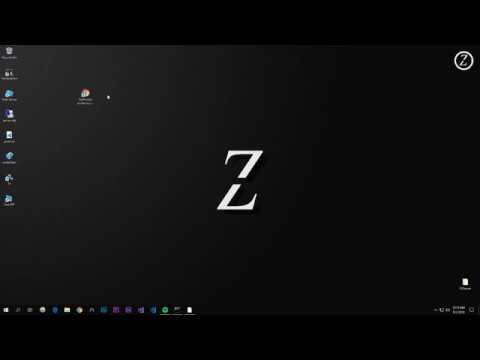](https://www.youtube.com/watch?v=qphtBvXSusE) or [Click Here](www.youtube.com/watch?v=qphtBvXSusE) Note this is a bit out of date. ______ [Discord](https://discord.gg/yWddFpQ) :) [](https://discordbots.org/bot/483787947070586880) ------- ## __FAQ__ | **Error** | **Solution** | **Example**| | ------ | ------ | ------- | | `Error: Invalid URI ` | Set the FiveM server URL correctly: No `<>` symbols and no spaces between the port and **No** `http://` | `$set 69.20.156.100:30120` | | `FetchError: invalid json response body [...] reason: Unexpected token in JSON` | Please use *your direct IP address*, __not the cfx.re shortened URL__ | DO NOT: `$set cfx.re/join/wjhe2g:30120` <- that is not your IP, INSTEAD DO: `$set 69.20.156.100:30120` <- using your own IP | ## Support The Project by becoming a ___[Patron](https://www.patreon.com/fivembot)___ to access tons of premium features and keep this project up for free! --- # FiveM Discord Bot - Monitor your FiveM Server easily. | Status | Upvotes | Servers | Owner | |--------|---------|---------|-------| |  |  |  |  ##### All New FiveM Monitor Functionality - it tells you when your FiveM Server goes online/offline!  ## No Advanced Setup Required! **FiveM Bot** is a discord bot by *Zua* that makes monitoring your FiveM server easily. https://discordbots.org/bot/483787947070586880 ## __Set-Up__ 1. Invite the [bot](https://discord.com/api/oauth2/authorize?client_id=483787947070586880&permissions=3072&scope=bot%20applications.commands) 2. In any channel, type `$set <serverAddress:Port>` (example: `$set 82.252.125.20:30120`) 3. The Bot is now setup, do `$help` to see all the commands _____ ## __Commands__ `$help` Sends Help Embed `$set <serverAddress:withPort>` - Sets the IP of the FiveM Server for the bot `$players` - Gets the current player list of a server `$info` - Gets all information of a server `$hide` - Enables/disables (toggles) server IP address from being shown in bot messages `$find <username>` - Finds a user that is on the server via Username `$id <id>` - Finds a user that is on the server via Server ID `$status` - Checks the current status of the server `$status` - Checks if the server is online `$stats` - Checks bot statistics `$forum` - Checks the current categories on https://forum.fivem.net/ `$forum <category>` - Displays the latest topics in the respective category on https://forum.fivem.net/ `$forum search <search terms>` - Searches terms on https://forum.fivem.net/ `$forum user <username>` - Displays user's profile info on https://forum.fivem.net/ [](https://patreon.com/fivembot) `$save-log <person's server id>` - Saves a player's information `$get-log` - Gets a player's information (per guild) `$monitor set <#channel>` - Sets a channel to send updates about the status of your FiveM Server in real-time `$monitor` - Sends monitor help information. `$monitor toggle` - Enables/disables (toggles) real-time updates being sent to the specified channel `$monitor mode update` - Change monitor mode to __update__ - where the bot will send you updates every `13 minutes`. [__**[Demonstration](https://media.discordapp.net/attachments/434781528455774208/865638881877295134/unknown.png)**__] `$monitor mode default` - Change monitor mode to __default__ - where the bot will send you updates whenever your server goes offline/online (state change). __**[[Demonstration](https://media.discordapp.net/attachments/388492127501287429/858757523535691806/show.png)**__] `$rcon help` - Sends RCON help information. `$rcon set <rcon_pwd>` - Sets the guild's RCON server password `$rcon <query_commands>` - Executes an [RCON](https://docs.fivem.net/server-manual/server-commands/) Command remotely to your FiveM Server. ______ ## __Tutorial/Demonstration__ [](https://www.youtube.com/watch?v=qphtBvXSusE) or [Click Here](www.youtube.com/watch?v=qphtBvXSusE) Note this is a bit out of date. ______ [Discord](https://discord.gg/yWddFpQ) :) [](https://discordbots.org/bot/483787947070586880) ------- ## __FAQ__ | **Error** | **Solution** | **Example**| | ------ | ------ | ------- | | `Error: Invalid URI ` | Set the FiveM server URL correctly: No `<>` symbols and no spaces between the port and **No** `http://` | `$set 69.20.156.100:30120` | | `FetchError: invalid json response body [...] reason: Unexpected token in JSON` | Please use *your direct IP address*, __not the cfx.re shortened URL__ | DO NOT: `$set cfx.re/join/wjhe2g:30120` <- that is not your IP, INSTEAD DO: `$set 69.20.156.100:30120` <- using your own IP | ## Support The Project by becoming a ___[Patron](https://www.patreon.com/fivembot)___ to access tons of premium features and keep this project up for free! --- देखेंआमंत्रित करेंवोट करें (0)
BetterCensoring4Automationcensor+3देखेंआमंत्रित करेंवोट करें (0)BetterCensoring is a new, highly customisable word filtering bot that gives you access to a range of useful features. <br> Here are just some of the features available: • Filtering edited messages and members' nicknames • Choose how strict the filter is, whether that means ignoring spaces or filtering attempted bypasses • Bypass detection feature that can remove inappropriate cyrillic characters, zalgo, fancy text and more • Have messages automatically be reposted by a webhook representing the user, with the phrases censored • Avoid filtering messages from users with a specified role <br> BetterCensoring is constantly being updated to give you access to useful new features that help you ensure the safety of your community. Interested? Give it a go! Find out more information at https://censoring.ioBetterCensoring is a new, highly customisable word filtering bot that gives you access to a range of useful features. <br> Here are just some of the features available: • Filtering edited messages and members' nicknames • Choose how strict the filter is, whether that means ignoring spaces or filtering attempted bypasses • Bypass detection feature that can remove inappropriate cyrillic characters, zalgo, fancy text and more • Have messages automatically be reposted by a webhook representing the user, with the phrases censored • Avoid filtering messages from users with a specified role <br> BetterCensoring is constantly being updated to give you access to useful new features that help you ensure the safety of your community. Interested? Give it a go! Find out more information at https://censoring.ioदेखेंआमंत्रित करेंवोट करें (0)